⎈ Kubernetes Gateway API: A Hands-On Guide to Modern Traffic Management 🛠️



Introduction
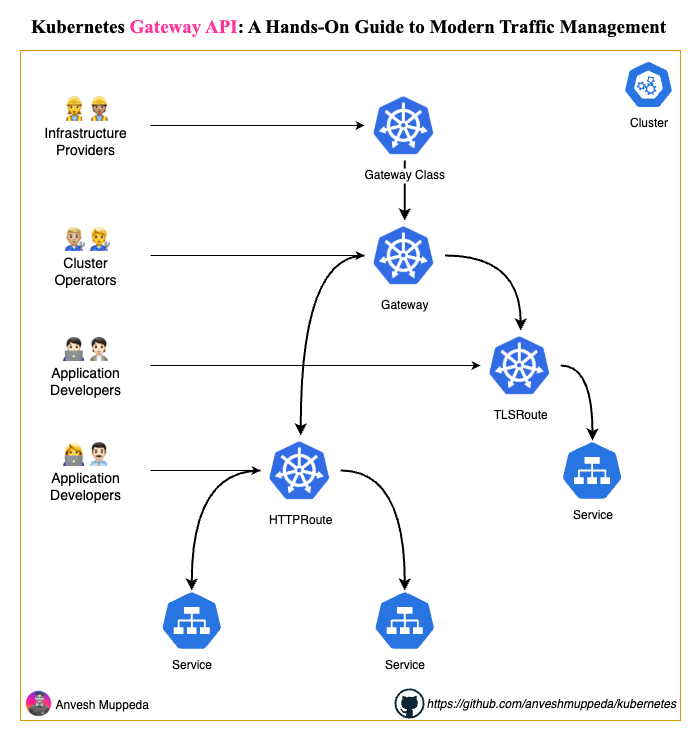
The Kubernetes Gateway API represents the next evolution of ingress traffic management in Kubernetes. Unlike the traditional Ingress resource, Gateway API provides a more expressive, extensible, and role-oriented approach to configuring network traffic routing.
In this hands-on guide, we'll explore the Gateway API by building a complete traffic management solution using Traefik as our gateway controller. You'll learn how to implement different routing strategies including hostname-based routing, path-based routing, and URL rewriting.
What You'll Learn
By the end of this tutorial, you'll understand:
- Gateway API architecture and core concepts
- Setting up Traefik as a Gateway Controller
- Creating GatewayClass and Gateway resources
- Implementing HTTPRoute for different routing scenarios
- Hostname-based and path-based traffic routing
- URL rewriting and traffic filtering
Prerequisites
Before we begin, ensure you have:
- A running Kubernetes cluster (we'll use kind for this tutorial - follow our kind setup guide)
kubectlconfigured to access your clusterhelmpackage manager installed- Basic understanding of Kubernetes concepts (Pods, Services, Deployments)
Architecture Overview
Step 1: Install Gateway API CRDs
First, we need to install the Gateway API Custom Resource Definitions (CRDs): Install Standard Channel
# Install Gateway API Standard Channel (GA and Beta resources)
kubectl apply --server-side -f https://github.com/kubernetes-sigs/gateway-api/releases/download/v1.4.0/standard-install.yaml
Verify the installation:
kubectl get crd | grep gateway
Step 2: Deploy the Sample Application
Let's create a simple web application that we'll use to demonstrate routing capabilities.
Create the Application Container
Our sample application is a simple HTML page with JavaScript routing:
<!DOCTYPE html>
<html lang="en">
<head>
    <meta charset="UTF-8">
    <meta name="viewport" content="width=device-width, initial-scale=1.0">
    <title>Simple Router</title>
</head>
<body>
    <div id="content"></div>
    <script>
        function router() {
            const path = window.location.pathname;
            const content = document.getElementById('content');
            switch(path) {
                case '/':
                    content.textContent = 'Welcome Home page';
                    break;
                case '/cart':
                    content.textContent = 'Welcome Cart page';
                    break;
                case '/billing':
                    content.textContent = 'Welcome Billing page';
                    break;
                case '/status':
                    content.textContent = 'Status: OK';
                    break;
                default:
                    content.textContent = '404 - Page not found';
            }
        }
        window.addEventListener('popstate', router);
        router();
    </script>
</body>
</html>
Deploy the Application
Create the deployment and service:
# deployment/simple-router-deploy.yaml
apiVersion: apps/v1
kind: Deployment
metadata:
  name: simple-router-app
  labels:
    app: simple-router
spec:
  replicas: 2
  selector:
    matchLabels:
      app: simple-router
  template:
    metadata:
      labels:
        app: simple-router
    spec:
      containers:
      - name: simple-router-container
        image: anvesh35/simple-router:v1.0.0
        ports:
        - containerPort: 80
        resources:
          requests:
            cpu: "100m"
            memory: "128Mi"
          limits:
            cpu: "500m"
            memory: "512Mi"
# deployment/simple-router-svc.yaml
apiVersion: v1
kind: Service
metadata:
  name: simple-router-svc
spec:
  type: ClusterIP
  selector:
    app: simple-router
  ports:
    - protocol: TCP
      port: 80
      targetPort: 80
Apply the resources:
kubectl apply -f deployment/
Step 3: Install Traefik with Gateway API Support
Traefik will serve as our Gateway Controller. Let's install it with Gateway API features enabled.
Add Traefik Helm Repository
helm repo add traefik https://traefik.github.io/charts
helm repo update
Configure Traefik Values
Create a values file to enable Gateway API support:
# traefik/values.yaml
logs:
  access:
    enabled: true

ports:
  web:
    port: 80
  websecure:
    port: 443
    exposedPort: 443

# Enable gateway-api features
providers:
  kubernetesGateway:
    enabled: true
    experimentalChannel: false

# Disable defaults - we'll provide our own
gatewayClass:
  enabled: false

gateway:
  enabled: false
Install Traefik
helm install traefik traefik/traefik \
  --values traefik/values.yaml \
  --namespace traefik \
  --create-namespace
Verify the installation:
kubectl get pods -n traefik
kubectl get svc -n traefik
Step 4: Create Gateway API Resources
Now let's create the Gateway API resources that define our traffic management rules.
Create GatewayClass
The GatewayClass defines which controller will handle our Gateway:
# gateway-class.yaml
apiVersion: gateway.networking.k8s.io/v1
kind: GatewayClass
metadata:
  name: traefik
  labels:
    app.kubernetes.io/name: traefik-gateway
    app.kubernetes.io/component: gateway-class
spec:
  controllerName: traefik.io/gateway-controller
Create Gateway
The Gateway defines the network entry points:
# gateway.yaml
apiVersion: gateway.networking.k8s.io/v1
kind: Gateway
metadata:
  name: gateway-api
  namespace: default
  labels:
    app.kubernetes.io/name: traefik-gateway
    app.kubernetes.io/component: gateway
spec:
  gatewayClassName: traefik

  listeners:
    - name: http
      protocol: HTTP
      port: 80
      allowedRoutes:
        namespaces:
          from: Same

    - name: https
      protocol: HTTPS
      port: 443
      tls:
        mode: Terminate
        certificateRefs:
          - name: secret-tls
            namespace: default
      allowedRoutes:
        namespaces:
          from: Same
Apply the Gateway resources:
kubectl apply -f gateway-class.yaml
kubectl apply -f gateway.yaml
Verify the Gateway status:
kubectl get gateway
kubectl describe gateway gateway-api
Step 5: Implement Hostname-Based Routing
Let's create an HTTPRoute that routes traffic based on the hostname:
# http-route-by-hostname.yaml
apiVersion: gateway.networking.k8s.io/v1
kind: HTTPRoute
metadata:
  name: simple-router-hostname
  namespace: default
  labels:
    app.kubernetes.io/name: simple-router
    app.kubernetes.io/component: httproute

spec:
  parentRefs:
  - name: gateway-api
    sectionName: http
    kind: Gateway

  hostnames:
  - demo.apigateway.com

  rules:
  - backendRefs:
    - name: simple-router-svc
      port: 80
      weight: 1
Apply and test:
kubectl apply -f http-route-by-hostname.yaml

# Test with curl (replace with your actual gateway IP)
curl -H "Host: demo.apigateway.com" http://<GATEWAY_IP>/
Step 6: Implement Path-Based Routing (Exact Match)
Create an HTTPRoute that matches exact paths:
# httproute-by-path-exact.yaml
apiVersion: gateway.networking.k8s.io/v1
kind: HTTPRoute
metadata:
  name: simple-router-exact
  namespace: default
  labels:
    app.kubernetes.io/name: simple-router
    app.kubernetes.io/component: httproute

spec:
  parentRefs:
  - name: gateway-api
    sectionName: http
    kind: Gateway

  hostnames:
  - demo.apigateway.com

  rules:
  - matches:
    - path:
        type: Exact
        value: /
    backendRefs:
    - name: simple-router-svc
      port: 80
      weight: 1
Apply and test:
kubectl apply -f httproute-by-path-exact.yaml

# Test exact path matching
curl -H "Host: demo.apigateway.com" http://<GATEWAY_IP>/
curl -H "Host: demo.apigateway.com" http://<GATEWAY_IP>/cart  # This should fail
Step 7: Implement URL Rewriting
Create an HTTPRoute with URL rewriting capabilities:
# httproute-by-path-rewrite.yaml
apiVersion: gateway.networking.k8s.io/v1
kind: HTTPRoute
metadata:
  name: simple-router-rewrite
  namespace: default
  labels:
    app.kubernetes.io/name: simple-router
    app.kubernetes.io/component: httproute

spec:
  parentRefs:
  - name: gateway-api
    sectionName: http
    kind: Gateway

  hostnames:
  - demo.apigateway.com

  rules:
  - matches:
    - path:
        type: PathPrefix
        value: /api/python
    filters:
    - type: URLRewrite
      urlRewrite:
        path:
          type: ReplacePrefixMatch
          replacePrefixMatch: /
    backendRefs:
    - name: simple-router-svc
      port: 80
      weight: 1
Apply and test:
kubectl apply -f httproute-by-path-rewrite.yaml

# Test URL rewriting
curl -H "Host: demo.apigateway.com" http://<GATEWAY_IP>/api/python
Step 8: Configure Local Testing with /etc/hosts
For testing from your browser, you'll need to configure your local /etc/hosts file to point the domain to your kind cluster.
Get the Gateway External IP
For kind cluster, get the node IP:
# Get kind cluster node IP
kubectl get nodes -o wide

# Or get the service details
kubectl get svc -n traefik traefik
Update /etc/hosts File
Edit your /etc/hosts file:
sudo nano /etc/hosts
Add the following line (replace with your actual kind node IP):
127.0.0.1 demo.apigateway.com
Your /etc/hosts file should look like:
##
# Host Database
#
# localhost is used to configure the loopback interface
# when the system is booting.  Do not change this entry.
##
127.0.0.1       demo.apigateway.com
127.0.0.1       localhost
255.255.255.255 broadcasthost
::1             localhost
Port Forward for Local Testing
Since we're using kind, we need to port-forward the Traefik service:
kubectl port-forward -n traefik svc/traefik 8080:80
Now you can test in your browser:
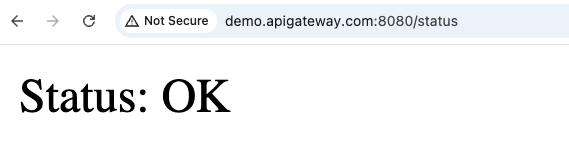
http://demo.apigateway.com:8080/- Home pagehttp://demo.apigateway.com:8080/cart- Cart pagehttp://demo.apigateway.com:8080/billing- Billing pagehttp://demo.apigateway.com:8080/api/python- URL rewrite test
Browser Testing Screenshots



Step 9: Testing and Verification
Test Different Routing Scenarios
# Test hostname routing
curl -H "Host: demo.apigateway.com" http://localhost:8080/

# Test path-based routing
curl -H "Host: demo.apigateway.com" http://localhost:8080/cart

# Test URL rewriting
curl -H "Host: demo.apigateway.com" http://localhost:8080/api/python
Monitor Traffic
Check Traefik logs to see routing decisions:
kubectl logs -n traefik deployment/traefik -f
Step 10: Advanced Configuration
Multiple Backend Services
You can route to multiple services with traffic splitting:
rules:
- backendRefs:
  - name: simple-router-svc-v1
    port: 80
    weight: 80
  - name: simple-router-svc-v2
    port: 80
    weight: 20
Header-Based Routing
Route based on HTTP headers:
rules:
- matches:
  - headers:
    - name: "X-Version"
      value: "v2"
  backendRefs:
  - name: simple-router-svc-v2
    port: 80
Troubleshooting
Common Issues and Solutions
-
Gateway not ready
kubectl describe gateway gateway-api
# Check events and conditions -
HTTPRoute not working
kubectl describe httproute simple-router-hostname
# Verify parentRefs and backend services -
Traefik not receiving traffic
kubectl get svc -n traefik
# Ensure service is properly exposed
Cleanup
Remove all resources:
kubectl delete -f httproute-by-path-rewrite.yaml
kubectl delete -f httproute-by-path-exact.yaml
kubectl delete -f http-route-by-hostname.yaml
kubectl delete -f gateway.yaml
kubectl delete -f gateway-class.yaml
kubectl delete -f deployment/
helm uninstall traefik -n traefik
kubectl delete namespace traefik
Key Takeaways
- Gateway API vs Ingress: Gateway API provides more expressive and role-oriented traffic management
- Resource Hierarchy: GatewayClass → Gateway → HTTPRoute creates a clear separation of concerns
- Flexible Routing: Support for hostname, path, header, and query parameter-based routing
- Traffic Management: Built-in support for traffic splitting, URL rewriting, and filtering
- Controller Agnostic: Works with multiple ingress controllers (Traefik, Istio, Envoy Gateway, etc.)
What's Next?
- Explore HTTPS/TLS termination with Gateway API
- Implement advanced traffic policies (rate limiting, authentication)
- Set up cross-namespace routing with ReferenceGrant
- Integrate with service mesh for advanced traffic management
References
Author: Anvesh Muppeda | Repository: kubernetes
If you found this guide helpful, please ⭐ star the repository and share it with your network!