VPC Endpoints Demo with Lambda Functions
A hands-on AWS CDK project demonstrating how Lambda functions in private subnets can access AWS services (S3 and ECR) using VPC Endpoints instead of NAT Gateways, significantly reducing costs while maintaining security.
📚 Table of Contents
- Purpose
- Architecture
- What You'll Learn
- Prerequisites
- Project Structure
- Deployment Guide
- Testing the Stack
- Understanding VPC Endpoints
- Cost Comparison
- Cleanup
- Troubleshooting
🎯 Purpose
This project demonstrates a cost-effective approach to enabling Lambda functions in private subnets to access AWS services without using expensive NAT Gateways. By using VPC Endpoints, you can:
- Save costs: Eliminate NAT Gateway charges (~$32/month + data transfer)
- Improve security: Keep traffic within AWS network
- Enhance performance: Direct connectivity to AWS services
- Learn hands-on: Understand VPC Endpoints through practical examples
🏗️ Architecture
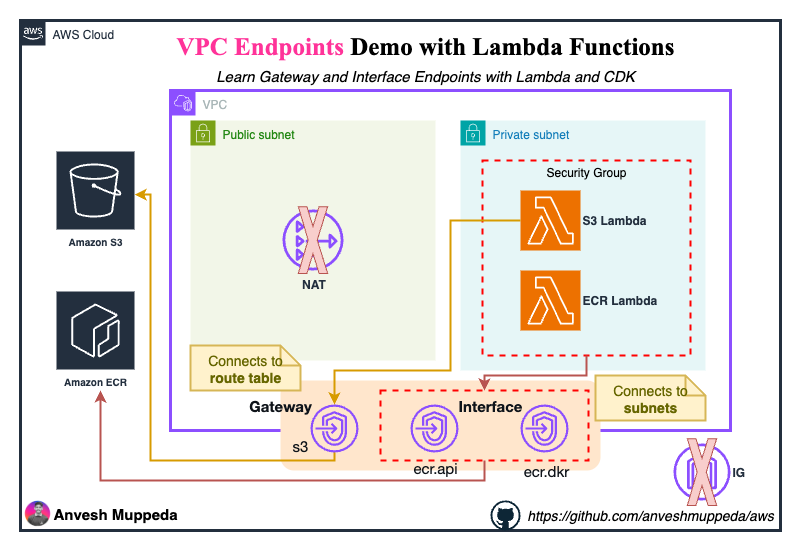
Key Components
- VPC: Custom VPC (10.10.0.0/16) with DNS support enabled
- Subnets:
- Public Subnet (10.10.0.0/24) - with Internet Gateway
- Private Subnet (10.10.10.0/24) - isolated, no internet access
- Lambda Functions:
- S3 Lambda - Tests S3 connectivity via Gateway Endpoint
- ECR Lambda - Tests ECR connectivity via Interface Endpoints
- VPC Endpoints:
- S3 Gateway Endpoint (Free)
- ECR API Interface Endpoint (~$7.30/month)
- ECR Docker Interface Endpoint (~$7.30/month)
- Security Groups:
- Lambda SG - Allows all outbound traffic
- VPC Endpoint SG - Allows traffic from Lambda SG
🎓 What You'll Learn
By working through this project, you'll understand:
-
VPC Endpoints Fundamentals
- Difference between Gateway and Interface endpoints
- When to use each type
- Cost implications
-
Network Architecture
- Private subnet design without NAT Gateway
- Security group configurations
- Route table management
-
Lambda in VPC
- Deploying Lambda in private subnets
- Configuring Lambda security groups
- IAM roles and permissions
-
Hands-on Testing
- Validating S3 connectivity
- Testing ECR access
- Reading CloudWatch logs
📋 Prerequisites
Before you begin, ensure you have:
- AWS Account with appropriate permissions
- AWS CLI installed and configured
- AWS CDK installed (
npm install -g aws-cdk) - Python 3.13 or compatible version
- Node.js (for CDK)
- Git (optional, for cloning)
Install AWS CDK
npm install -g aws-cdk
cdk --version
Configure AWS CLI
aws configure
# Enter your AWS Access Key ID, Secret Access Key, Region, and Output format
📁 Project Structure
vpc-endpoints/
├── README.md
├── app.py                          # CDK app entry point
├── cdk.json                        # CDK configuration
├── requirements.txt                # Python dependencies
├── vpc_endpoints/
│   └── vpc_endpoints_stack.py     # Main stack definition
└── lambda/
    ├── s3/
    │   └── index.py               # S3 test Lambda
    └── ecr/
        └── index.py               # ECR test Lambda
🚀 Deployment Guide
Step 1: Clone or Create Project
git clone https://github.com/anveshmuppeda/aws.git
cd cdk/python/vpc-endpoints
If starting from scratch:
mkdir vpc-endpoints-demo
cd vpc-endpoints-demo
Step 2: Set Up Python Environment
# Create virtual environment
python3 -m venv .venv

# Activate virtual environment
# On macOS/Linux:
source .venv/bin/activate
# On Windows:
.venv\Scripts\activate

# Install dependencies
pip install -r requirements.txt
Step 3: Create Lambda Function Code
Create the directory structure:
mkdir -p lambda/s3
mkdir -p lambda/ecr
Create lambda/s3/index.py:
import json
import boto3
from botocore.exceptions import ClientError

def lambda_handler(event, context):
    """Test S3 connectivity via VPC Gateway Endpoint"""
    s3_client = boto3.client('s3')

    try:
        # List S3 buckets
        response = s3_client.list_buckets()
        buckets = [bucket['Name'] for bucket in response.get('Buckets', [])]

        print(f"✓ Successfully connected to S3!")
        print(f"✓ Found {len(buckets)} buckets")

        return {
            'statusCode': 200,
            'body': json.dumps({
                'message': 'S3 connectivity successful via VPC Gateway Endpoint',
                'bucket_count': len(buckets),
                'buckets': buckets[:5]  # First 5 buckets
            }, indent=2)
        }

    except ClientError as e:
        print(f"✗ Failed to connect to S3: {e}")
        return {
            'statusCode': 500,
            'body': json.dumps({
                'error': str(e),
                'message': 'Failed to connect to S3'
            })
        }
Create lambda/ecr/index.py:
import json
import boto3
from botocore.exceptions import ClientError

def lambda_handler(event, context):
    """Test ECR connectivity via VPC Interface Endpoints"""
    ecr_client = boto3.client('ecr')

    try:
        # List ECR repositories
        response = ecr_client.describe_repositories(maxResults=10)
        repositories = response.get('repositories', [])

        print(f"✓ Successfully connected to ECR!")
        print(f"✓ Found {len(repositories)} repositories")

        repo_list = [
            {
                'name': repo['repositoryName'],
                'uri': repo['repositoryUri']
            }
            for repo in repositories
        ]

        return {
            'statusCode': 200,
            'body': json.dumps({
                'message': 'ECR connectivity successful via VPC Interface Endpoints',
                'repository_count': len(repositories),
                'repositories': repo_list
            }, indent=2)
        }

    except ClientError as e:
        print(f"✗ Failed to connect to ECR: {e}")
        return {
            'statusCode': 500,
            'body': json.dumps({
                'error': str(e),
                'message': 'Failed to connect to ECR'
            })
        }
Step 4: Bootstrap CDK (First Time Only)
cdk bootstrap aws://ACCOUNT-ID/REGION
Replace ACCOUNT-ID with your AWS account ID and REGION with your target region (e.g., us-east-1).
Step 5: Synthesize CloudFormation Template
cdk synth
This generates the CloudFormation template. Review it to understand what will be created.
Step 6: Deploy the Stack
cdk deploy
You'll see a summary of resources to be created. Type y to confirm.
Deployment time: Approximately 3-5 minutes
Expected output:
✅  VpcEndpointsStack

✨  Deployment time: 234.56s

Outputs:
VpcEndpointsStack.S3FunctionName = vpc-endpoints-demo-s3-lambda-function
VpcEndpointsStack.ECRFunctionName = vpc-endpoints-demo-ecr-lambda-function

Stack ARN:
arn:aws:cloudformation:us-east-1:123456789012:stack/VpcEndpointsStack/...
🧪 Testing the Stack
Test 1: S3 Lambda Function
The S3 Lambda tests connectivity to S3 via the Gateway Endpoint.
Using AWS CLI:
aws lambda invoke \
  --function-name vpc-endpoints-demo-s3-lambda-function \
  --payload '{}' \
  response.json

cat response.json | jq '.'
Using AWS Console:
- Go to Lambda Console
- Select
vpc-endpoints-demo-s3-lambda-function - Click Test tab
- Create a new test event (use default empty JSON
{}) - Click Test
Expected Success Output:
{
  "statusCode": 200,
  "body": {
    "message": "S3 connectivity successful via VPC Gateway Endpoint",
    "bucket_count": 5,
    "buckets": [
      "my-bucket-1",
      "my-bucket-2",
      "my-bucket-3"
    ]
  }
}
Check CloudWatch Logs:
aws logs tail /aws/lambda/vpc-endpoints-demo-s3-lambda-function --follow
Test 2: ECR Lambda Function
The ECR Lambda tests connectivity to ECR via Interface Endpoints.
Using AWS CLI:
aws lambda invoke \
  --function-name vpc-endpoints-demo-ecr-lambda-function \
  --payload '{}' \
  response.json

cat response.json | jq '.'
Using AWS Console:
- Go to Lambda Console
- Select
vpc-endpoints-demo-ecr-lambda-function - Click Test tab
- Create a new test event (use default empty JSON
{}) - Click Test
Expected Success Output:
{
  "statusCode": 200,
  "body": {
    "message": "ECR connectivity successful via VPC Interface Endpoints",
    "repository_count": 2,
    "repositories": [
      {
        "name": "my-app",
        "uri": "123456789012.dkr.ecr.us-east-1.amazonaws.com/my-app"
      }
    ]
  }
}
Note: If you don't have any ECR repositories, the count will be 0, which is normal.
Check CloudWatch Logs:
aws logs tail /aws/lambda/vpc-endpoints-demo-ecr-lambda-function --follow
Test 3: Verify VPC Endpoints
Check S3 Gateway Endpoint:
aws ec2 describe-vpc-endpoints \
  --filters "Name=service-name,Values=com.amazonaws.us-east-1.s3" \
  --query 'VpcEndpoints[*].[VpcEndpointId,ServiceName,State]' \
  --output table
Check ECR Interface Endpoints:
aws ec2 describe-vpc-endpoints \
  --filters "Name=service-name,Values=com.amazonaws.us-east-1.ecr.*" \
  --query 'VpcEndpoints[*].[VpcEndpointId,ServiceName,State]' \
  --output table
Test 4: Verify Security Groups
Lambda Security Group:
aws ec2 describe-security-groups \
  --filters "Name=group-name,Values=vpc-endpoints-demo-lambda-sg" \
  --query 'SecurityGroups[*].[GroupId,GroupName,IpPermissionsEgress]' \
  --output json
VPC Endpoint Security Group:
aws ec2 describe-security-groups \
  --filters "Name=group-name,Values=vpc-endpoints-demo-ecr-endpoint-sg" \
  --query 'SecurityGroups[*].[GroupId,GroupName,IpPermissions]' \
  --output json
📊 Understanding VPC Endpoints
Gateway Endpoints vs Interface Endpoints
| Feature | Gateway Endpoint | Interface Endpoint |
|---|---|---|
| Services | S3, DynamoDB | Most AWS services (ECR, SNS, SQS, etc.) |
| Technology | Route table entry | Elastic Network Interface (ENI) |
| Cost | FREE | |
| Private IP | No | Yes (in your subnet) |
| Security Groups | Not supported | Supported |
| DNS | Uses public DNS | Can use private DNS |
| Access Method | Route table routing | ENI with private IP |
How S3 Gateway Endpoint Works
- Lambda makes request to S3 (e.g.,
s3.us-east-1.amazonaws.com) - VPC route table has entry:
pl-xxxxx (S3 prefix list) → vpce-xxxxx - Traffic routes directly to S3 via AWS private network
- No internet, no NAT Gateway needed
How ECR Interface Endpoints Work
- Lambda makes request to ECR (e.g.,
api.ecr.us-east-1.amazonaws.com) - Private DNS resolves to ENI private IP (10.10.10.x)
- Traffic goes to ENI in private subnet
- ENI forwards to ECR via AWS PrivateLink
- All traffic stays within AWS network
💰 Cost Comparison
Traditional Approach (with NAT Gateway)
| Resource | Monthly Cost |
|---|---|
| NAT Gateway | ~$32.40 |
| Data Processing (10GB) | ~$0.45 |
| Total | ~$32.85/month |
VPC Endpoints Approach (This Project)
| Resource | Monthly Cost |
|---|---|
| S3 Gateway Endpoint | $0.00 (Free) |
| ECR API Interface Endpoint | ~$7.30 |
| ECR Docker Interface Endpoint | ~$7.30 |
| Data Processing (10GB) | ~$0.10 |
| Total | ~$14.70/month |
Savings: ~$18/month (55% cost reduction)
When to Use Each Approach
Use VPC Endpoints when:
- Lambda only needs to access specific AWS services
- Cost optimization is important
- Traffic should stay within AWS network
- You need better performance (lower latency)
Use NAT Gateway when:
- Lambda needs to access the internet
- Lambda needs to access third-party APIs
- You need to access multiple AWS services (endpoints add up)
- You have high data transfer requirements
🧹 Cleanup
To avoid ongoing charges, delete the stack when you're done testing.
Option 1: Using CDK
cdk destroy
Type y to confirm deletion.
Option 2: Using AWS Console
- Go to CloudFormation Console
- Select
VpcEndpointsStack - Click Delete
- Confirm deletion
Option 3: Using AWS CLI
aws cloudformation delete-stack --stack-name VpcEndpointsStack
Verify Deletion
Wait a few minutes, then verify:
aws cloudformation describe-stacks --stack-name VpcEndpointsStack
You should see: Stack with id VpcEndpointsStack does not exist
Resources Deleted
The following resources will be automatically deleted:
- VPC and all subnets
- Internet Gateway
- Route tables and associations
- Security groups
- Lambda functions
- VPC Endpoints (S3, ECR API, ECR Docker)
- IAM roles and policies
- CloudWatch Log Groups
Note: Some resources like CloudWatch Logs may take a few extra minutes to delete.
🔧 Troubleshooting
Lambda Timeout Error
Symptom: Lambda function times out after 10 seconds
Possible Causes:
- VPC Endpoint not created properly
- Security group blocking traffic
- Route table not configured correctly
Solutions:
Check VPC Endpoints exist:
aws ec2 describe-vpc-endpoints --output table
Verify Security Groups:
# Lambda SG should allow all outbound
aws ec2 describe-security-groups \
  --filters "Name=group-name,Values=vpc-endpoints-demo-lambda-sg"

# VPC Endpoint SG should allow inbound from Lambda SG
aws ec2 describe-security-groups \
  --filters "Name=group-name,Values=vpc-endpoints-demo-ecr-endpoint-sg"
Check Route Table:
aws ec2 describe-route-tables \
  --filters "Name=tag:Name,Values=vpc-endpoints-demo-private-rt"
S3 Access Denied
Symptom: Lambda returns 403 Forbidden when accessing S3
Solution: Verify Lambda IAM role has S3 permissions:
aws iam get-role --role-name VpcEndpointsStack-LambdaExecutionRole*
The role should have AmazonS3ReadOnlyAccess policy attached.
ECR Repository Not Found
Symptom: ECR Lambda returns empty list
This is normal! If you don't have any ECR repositories, the function will return:
{
  "repository_count": 0,
  "repositories": []
}
To create a test repository:
aws ecr create-repository --repository-name test-repo
Private DNS Not Resolving
Symptom: ECR endpoint DNS not resolving to private IP
Solution: Ensure VPC has DNS support enabled:
aws ec2 describe-vpc-attribute \
  --vpc-id vpc-xxxxx \
  --attribute enableDnsHostnames

aws ec2 describe-vpc-attribute \
  --vpc-id vpc-xxxxx \
  --attribute enableDnsSupport
Both should return true.
CloudWatch Logs Not Appearing
Solution: Wait 1-2 minutes after Lambda execution, then check:
aws logs describe-log-groups --log-group-name-prefix /aws/lambda/vpc-endpoints-demo
📝 Additional Resources
AWS Documentation
AWS CDK
Best Practices
🎯 Next Steps
After completing this hands-on guide, consider:
-
Extend the Demo:
- Add more VPC endpoints (DynamoDB, SNS, SQS)
- Create Lambda functions that write to S3
- Set up VPC Flow Logs to analyze traffic
-
Production Considerations:
- Implement VPC endpoint policies for fine-grained access control
- Use multiple Availability Zones for high availability
- Add CloudWatch alarms for monitoring
- Implement Infrastructure as Code best practices
-
Write a Blog Post:
- Share your learnings on Medium
- Include architecture diagrams
- Add cost comparison charts
- Provide real-world use cases
🤝 Contributing
Found an issue or want to improve this guide? Feel free to:
- Open an issue
- Submit a pull request
- Share your feedback
📄 License
This project is provided as-is for educational purposes.
⭐ Acknowledgments
Special thanks to the AWS community and CDK team for making infrastructure as code accessible and powerful.
Happy Learning! 🚀
If you found this guide helpful, please consider:
- ⭐ Starring the repository
- 📝 Writing about your experience
- 🔗 Sharing with others learning AWS
Questions or Issues? Feel free to open an issue or reach out to the community for help!